A school group or multi-campus institution gets admissions messaging right when three things are settled: who owns each type of enquiry, how a message reaches the campus or team that can answer it, and where everyone finds the same answers. Put each campus in its own queue under one group setup, route on what the person tells you, and keep one source of answers for the whole group.
Without that, every campus runs its own version. One uses a shared mailbox, another a chat widget nobody watches overnight, and a third has an admissions officer answering parents from a personal phone. Head office finds out something went wrong when a complaint arrives.
This guide covers the operating choices, in the UK and South Africa, and how to start without rebuilding everything at once.
Central, campus-led or hybrid?
There are three broad ways to organise admissions messaging across sites. None is right for every group.

Model | How it works | Suits | Watch out for |
|---|---|---|---|
Central | One admissions team answers every enquiry for every campus | Groups with one brand and shared courses | Losing local knowledge: parking, the head of sixth form, the open evening date |
Campus-led | Each campus answers its own enquiries | Schools with strong local identities and loyal parents | No group view, uneven response times, different answers to the same question |
Hybrid | A central team takes first contact and general questions; campuses take anything local | Groups with several sites and a mix of shared and local courses | Clear hand-off rules, so nothing sits between the two |
In the UK, independent school groups lean on each school's own identity, because parents choose a school, not a group. FE college groups and private providers with several sites may want one standard and one front door instead.
In South Africa, private higher education groups with campuses in several provinces can face a different problem: applicants who don't know which campus to choose, so the first job can be helping them decide.
Whichever model you choose, write it down. Every campus should know where its responsibility starts and stops.
One number or one per campus?
Option | Works when | Trade-off |
|---|---|---|
One WhatsApp number for the group, routed by campus | Applicants don't know which campus they want, or you advertise as one brand | You need a routing question at the start |
A WhatsApp entry point per campus | Parents are loyal to "their" school and already have its details | Head office needs a view across every entry point |
Both work in Cue. You can run one WhatsApp number your applicants and parents recognise and hand each conversation to the campus that can help, or give each campus its own entry point. Either way, every campus works its own queue.
Routing enquiries to the right campus and team
Cue sends an enquiry to the right place in three ways:
The channel or entry point it arrived on. A message to the Leeds campus number goes to Leeds.
What the person tells you at the start. A short menu asks which campus, which course, or whether they're a parent, applicant or current student.
Data from your own systems. A known contact is routed using what your CRM already holds.
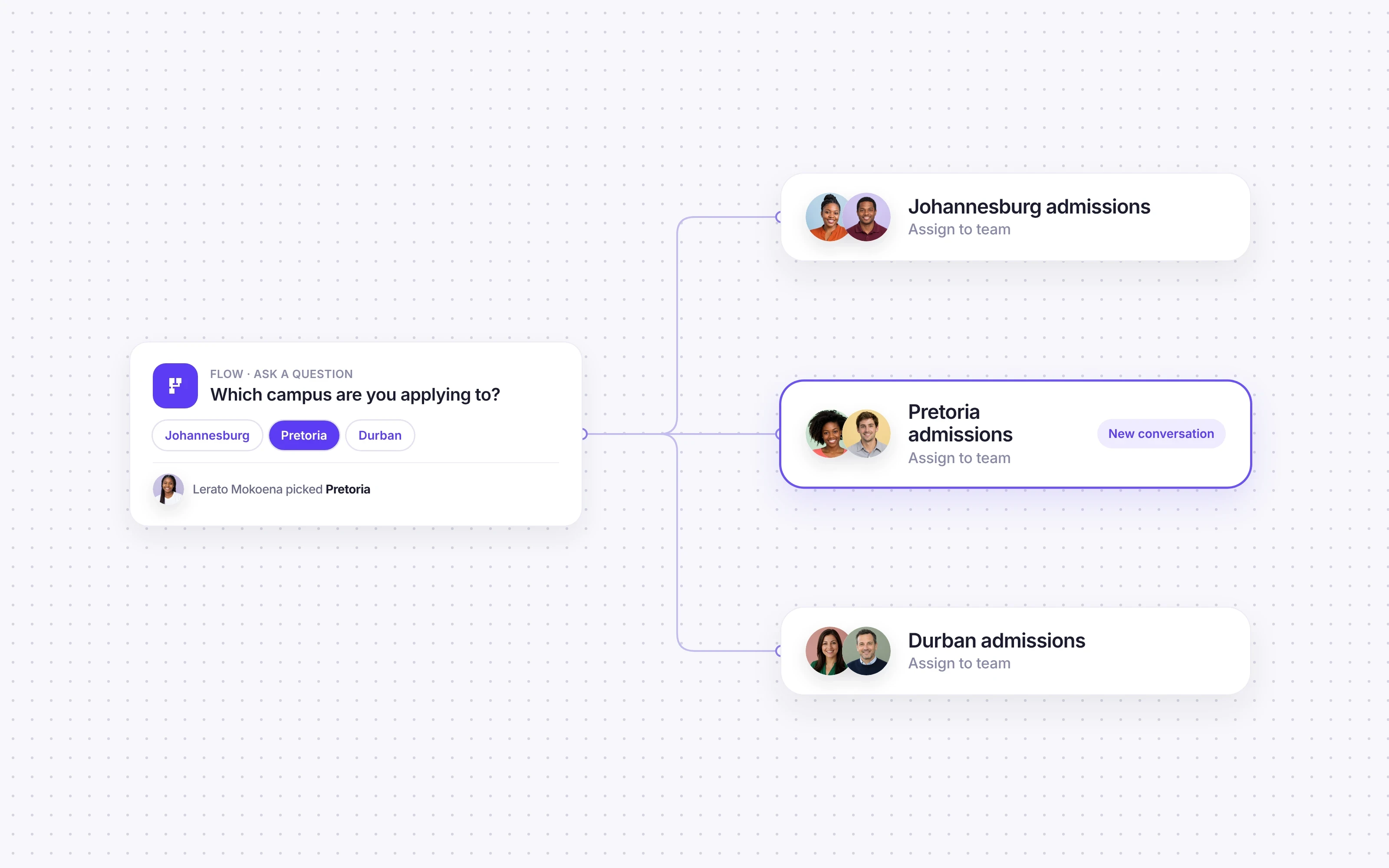
Once a conversation lands with a campus team, Auto-Assign shares the work out by round robin or to whoever is least busy, choosing only from people on that team, in that role, who are online. Nothing sits unassigned.
Useful routing rules for education groups:
Applicant, parent or current student, because each goes to a different team.
Campus or school, when the group runs more than one.
Course area or department, for larger campuses.
Admissions or finance, so fee questions don't land with an admissions officer.
One set of answers across the group
The same question, asked at two campuses, should get the same answer. That's harder than it sounds when each school keeps its own documents.
Keep group-wide answers in one place: the fees structure, term dates, the admissions process, entry requirements, uniform and transport policies. AI Agents in Cue answer routine questions from content you maintain, such as documents and website pages, so updating an answer once updates it for every campus. Anything that needs judgement goes to a person at the right campus, with the conversation history attached.
Local exceptions, such as a campus's open evening or a boarding house's arrangements, stay with that campus.
Templates work the same way. Head office approves the template centrally, and each campus sends it to its own contacts, personalised. A regional open day invitation still goes out in the group's words.
Comparing campuses fairly
Comparing sites is hard when each campus counts differently. When every campus works in the same platform, they're measured on the same queue and the same definitions.
In Cue, head office sees active contacts, open tickets, conversation volumes and channel share across the group, and can break live chat performance down by rep, team, tag or channel without exporting anything. A slow campus is slow for a real reason, not because it measures differently.
What to compare each month:
first response time by campus
conversations handled by each team
enquiries that converted to applications, if your CRM is connected
share of questions answered without a person
Start with one campus
You don't need to move the whole group at once. Pick one campus or school with a clear admissions owner and a busy intake, run phase one there, and use its results to roll the same setup across the group. That's how Cue works with larger groups: start with a handful of sites, then expand across the group once those sites are working.

Phase one is simple: confirmations, reminders and follow-ups on WhatsApp, with replies in a shared inbox. Our phase one plan covers what to move first. Once it works at one site, each new campus gets its own queue, team and entry point under the same group setup, with the same templates and answers.
Richfield, a South African higher education provider with campuses across the country, runs dedicated adviser lines in Cue and moved prospect follow-up to WhatsApp. Response rates rose sevenfold. Read the Richfield story.
Phone calls across campuses
Cue Phone brings calls into the same setup. Each campus can have its own number, or one group number can route callers to the right campus through a keypad menu with up to 12 options. Teams and opening hours are set per location, and calls are shared out by round robin, least calls today or longest idle.

Get a new UK or South African number through Cue, or bring your existing number across. In South Africa you can bring across a landline number. Mobile numbers can't be ported yet, but you can get a new South African mobile or local number through Cue. Numbers in other countries are available on request.
See Cue Phone for how calls and messages share one contact record.
To see how groups set up campuses, teams and routing in Cue, read about Cue for multi-location organisations and Cue for education, or book a demo.