
The free WhatsApp Business app is one of the best tools a small business can start with. It is free, it takes ten minutes to set up, and your customers are already there. For a founder answering every message personally, or a two-person shop, it does the job well.
The trouble starts when the business grows around it. More customers, more staff, more channels, and suddenly the app that felt so easy is quietly costing you sales, response time and visibility. The signs are easy to miss because none of them break anything on their own. They just add friction until one day the tool you started with is the thing slowing you down.
Here are seven signs you have outgrown the WhatsApp Business app, and what moving on actually involves.
Key takeaways
The free WhatsApp Business app is built for a single business identity on one phone, not a team handling high volumes.
Common ceilings include number blocks at scale, no true multi-agent access, no reporting, no routing, no automation and no CRM connection.
Outgrowing the app means moving to the WhatsApp Business Platform through an approved provider, which adds a shared inbox, automation, reporting and integrations.
If two or more of these signs sound familiar, it is worth evaluating a proper WhatsApp customer service platform.
The WhatsApp Business app vs the WhatsApp Business Platform
Before the signs, one distinction matters, because it explains every limitation below.
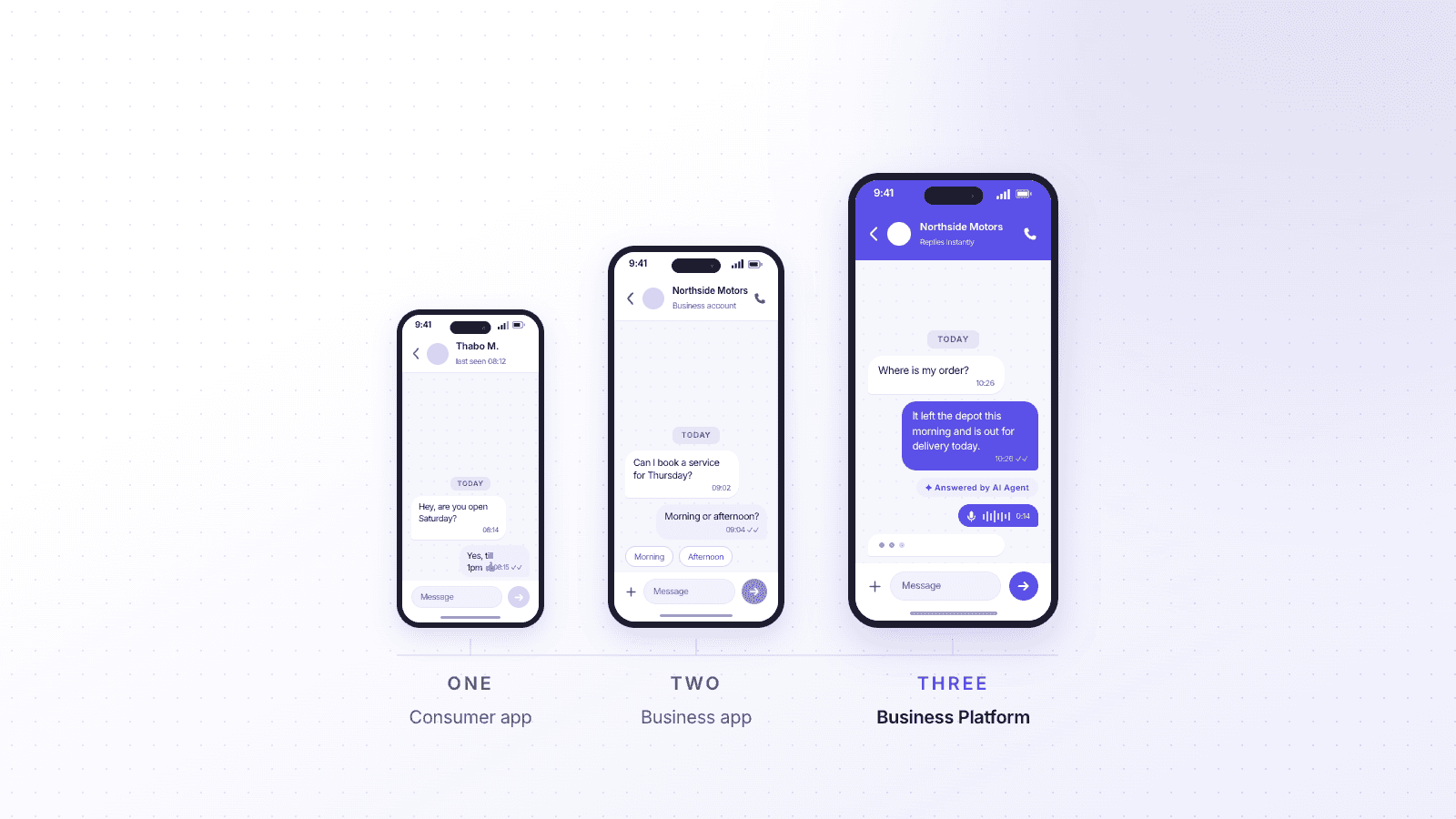
The WhatsApp Business app is Meta's free mobile app. It is tied to one phone number and one business account, with a handful of linked devices for convenience. It is designed for a single business owner or a very small team.
A WhatsApp Business Platform (using the WhatsApp Business API) is the version built for scale. You access it through an approved provider, also known as a Business Solution Provider, which connects your number to a full software platform. That is where multiple agents, automation, reporting and integrations become possible. Cue is one such provider.
Outgrowing the app almost always means moving to the Platform through a provider. Here is how to tell you are there.
1. Your number keeps getting blocked or restricted at volume
If you are sending broadcasts and reminders to more customers, and your number keeps getting flagged, restricted or blocked, you have hit the app's ceiling.
The free app was never built for volume outbound messaging. According to WhatsApp's own guidance, broadcast lists are capped at 256 recipients, and every recipient has to have saved your number first, which almost no customer does. Send too many messages to people who have not opted in, collect a few "block" or "report" taps, and Meta's spam systems step in. A blocked number is not a glitch. It is the app working as intended for a personal-scale tool.
The WhatsApp Business Platform handles volume the way Meta actually wants it done: through pre-approved message templates, clear opt-in, and an account quality rating that rewards good sending behaviour. On Cue, you send WhatsApp broadcasts to uploaded contact lists or Cue contacts, personalise them with variables and media, schedule them, and track delivery and read rates, all within Meta's rules rather than against them.
2. Only one account, shared across a few devices
The app gives you one business identity, and everyone works from it. There are no separate logins, no individual agents, and no way to see who is handling what.
WhatsApp has added linked devices, so a small number of people can be signed into the same account at once. But that is a shared login, not a team. Everyone sees every chat, two people can reply to the same customer without knowing, and you cannot tell who said what. There is no concept of assigning a conversation, keeping a private note, or holding an agent accountable for a reply. Once you have more than one or two people answering messages, this becomes a daily source of dropped and duplicated conversations.
A platform gives every agent their own login on the same WhatsApp number. Cue provides a shared inbox with unlimited seats, where each conversation can be assigned to one person, teams get their own views, and every reply is attributed. Ten agents can work one number without stepping on each other.
3. Conversations live on personal phones, and leave when staff do
If your customer conversations are sitting on an employee's phone, you do not really own them. When that person leaves, the history walks out with them.
This is one of the most expensive limitations and the easiest to overlook. The app ties conversations to a device. A staff member who has been messaging customers has months of context in their hand: what was promised, what was quoted, what is still open. When they resign, move team or simply lose the phone, that context is gone. The customer has to start again, and so does whoever picks up.
On a platform, conversations belong to the business, not the handset. Cue keeps the full history against each contact in a central workspace, so when an agent leaves, the next person opens the same thread and carries on. Nothing is stored on a personal device, and nothing leaves when people do.
4. You cannot see response times, volumes or any real reporting
If you cannot answer "how many conversations did we handle last week?" or "how fast are we replying?", you are running customer service blind.
The free app gives you the barest messaging counts and nothing that helps you manage a team. There is no view of response time, no resolution time, no volume by day, no breakdown by agent or channel. You cannot spot that Mondays are overwhelming your team, or that one agent is carrying twice the load, or that response times slipped the week you were short-staffed. You are making staffing and service decisions on gut feel.
A platform turns conversations into numbers you can act on. Cue reports on tickets, conversations, response and resolution times, and lets you filter by rep, team, tag or channel, alongside delivery and read reporting for broadcasts. You can see where time goes and where customers wait, and staff the queue accordingly.
5. You cannot route a chat to the right person or team
When every message lands in one shared pile and someone has to eyeball it and forward it manually, you have outgrown the app.
The free app has no routing. A sales question, a complaint and a delivery query all arrive in the same inbox, and a human has to read each one and decide who deals with it. That works with a trickle. At volume, messages sit unread because nobody owns them, or three people open the same one. There is no way to send billing queries to the finance team, or after-hours messages down a different path.
Routing is a core reason businesses move to a platform. Cue uses visual Flows to direct each conversation based on what the customer needs, the time of day or stored data, and Auto-Assign to distribute chats across a team by round-robin or least-busy. The right conversation reaches the right person without anyone playing traffic controller.
6. Every repetitive question is answered by hand
If your team types out the same answers to the same questions all day, you are paying people to do what automation should handle.
The app offers quick replies and simple away messages, and that is roughly the limit. It cannot ask a customer what they need and respond accordingly, collect an order number, answer a common policy question, or handle first-line queries out of hours. Every "what are your opening hours?", "where is my order?" and "do you deliver to my area?" is answered manually, one at a time, which is fine until the volume makes it impossible.
A platform automates the repetitive layer so people handle the exceptions. Cue combines Flows for structured journeys with knowledge-based AI Agents that answer routine questions from your own documents and website, then hand over to a human when a query needs judgement. The common questions get instant answers around the clock, and your team spends its time where it actually matters.
7. Nothing connects to your CRM, and history lives nowhere
If a customer messages you and your team has no idea who they are, what they have bought or where they are in the pipeline, your WhatsApp is disconnected from the rest of your business.
The free app is an island. It does not talk to your CRM, your helpdesk or your booking system. Every conversation starts from zero, with no view of the customer's record, and nothing you discuss on WhatsApp makes it back into the systems your business runs on. Leads get lost between the chat and the CRM, and reporting on where revenue comes from is impossible.
A platform closes that gap. Through its Flows and integrations, Cue can pull up and update contact records in tools like HubSpot, Salesforce and Zoho during a conversation, create or update helpdesk tickets, and sync conversation history back to your CRM, so WhatsApp becomes part of your customer record rather than a separate silo. The exact data and direction depend on the system and how it is set up, but the principle holds: the conversation and the customer record finally live in the same place.
So what does "outgrowing" the app actually mean?
It means moving from the free WhatsApp Business app to the WhatsApp Business Platform through an approved provider. Your customers notice no difference: they message the same number, in the same app they already use. Behind the scenes, that number now connects to real software, with a shared inbox, routing, automation, reporting and integrations.
You do not lose what made WhatsApp work. You keep the channel your customers prefer, and you add the operational backbone a growing team needs.
WhatsApp Business app vs a platform like Cue
Capability | Free WhatsApp Business app | WhatsApp Business Platform via Cue |
|---|---|---|
Best for | A solo owner or one to two people | A team handling higher volumes |
Users on one number | One shared account, a few linked devices | Multiple agents, each with their own login, unlimited seats |
Conversation ownership | No assignment, everyone sees everything | Assign chats to individuals and teams |
Where history lives | On a device | Central workspace, kept against each contact |
Reporting | Basic message counts | Response time, resolution time, volumes, by agent, team and channel |
Routing | Manual | Flows and Auto-Assign route to the right person |
Automation | Quick replies and away messages | Flows plus knowledge-based AI Agents |
Broadcasts | Capped at 256, recipients must save your number | Template broadcasts to contact lists, scheduled, with delivery and read reporting |
CRM and integrations | None | HubSpot, Salesforce, Zoho and more via Flows |
How to know it is time
You do not need all seven signs. Two or three is usually enough to justify a look at a proper platform. The clearest trigger is people: the moment more than one or two staff are answering customer messages, the app's single-account model starts costing you conversations. The second is volume: when broadcasts get your number restricted, or the manual answering cannot keep up, you have passed the point the free app was built for.
The goal is not to abandon WhatsApp. It is to run it properly. If you have reached that point and want to see how providers compare, our guide to the best WhatsApp providers is a useful next read.
Ready to run WhatsApp like a real support channel?
If two or three of these signs sound like your week, the free app has done its job and it is time for the next step. Cue connects your existing WhatsApp number to a shared team inbox, with routing, automation, reporting and CRM integrations, so nothing gets lost and no conversation depends on one person's phone. Your customers keep the WhatsApp they already use. Your team finally gets the tools behind it. Book a demo to see how Cue handles WhatsApp at scale.